Integrating a LinkedIn Creator Marketplace With Salesforce and HubSpot
Track creator campaign clicks through to closed deals by connecting LinkedIn to your CRM.

Integrating a LinkedIn creator marketplace with Salesforce and HubSpot turns creator campaigns into a measurable pipeline channel only when the tracking reaches the CRM. The connection must preserve which creator drove a visit, which campaign produced a contact, and which touchpoints influenced a deal. Discovery is not attribution. The practical value comes from carrying that context all the way to revenue.
Why creator campaigns stay disconnected from pipeline — and what that costs B2B marketing teams
A demand gen leader reaches the pipeline review with creator engagement numbers, but no way to connect them to opportunities. The CRM holds the form submission, yet says nothing about the creator post that brought the buyer to the landing page. Paid LinkedIn Ads get attribution credit while the money spent on creators looks like a bet made on faith. That gap makes the creator budget hard to defend at planning time.
LinkedIn's Creator Marketplace launched June 10, 2026, in alpha for US and Canada, with content limited to one language. It moves creator discovery into Campaign Manager, but does not automatically move engagement signals into Salesforce or HubSpot. Payments and contracts are also handled outside the platform. Marketing therefore has two separate records of the campaign, one describing creator activity and the other describing revenue, with no automatic bridge between them.
What a closed-loop creator attribution system actually means in practice
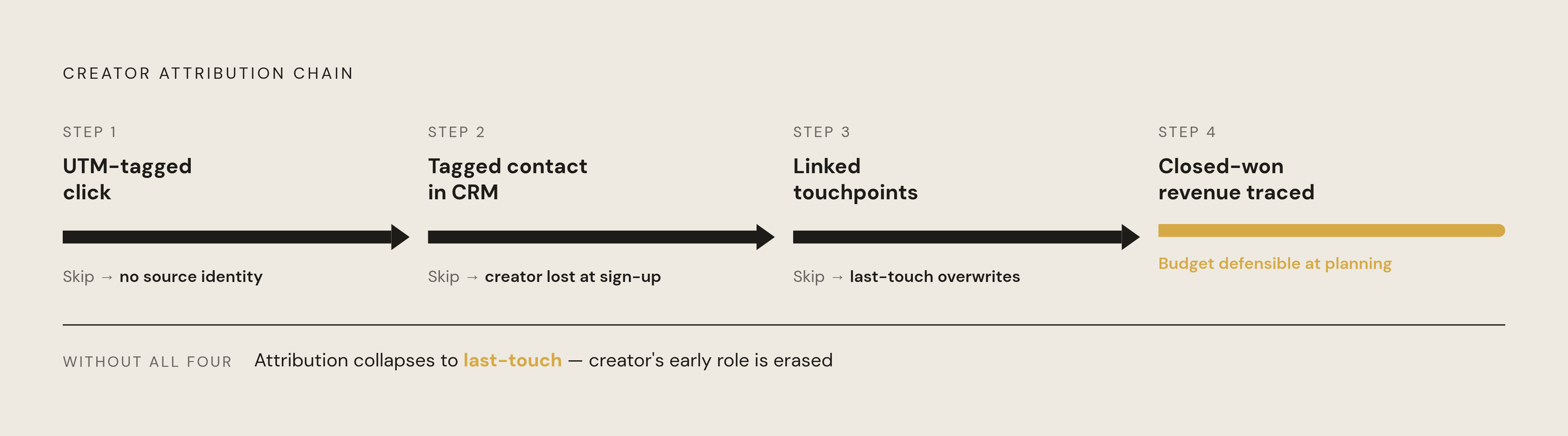
Consider an operations leader at a SaaS company who clicks a creator post, visits a landing page, and fills a form. In a closed-loop system, the URL carries the creator and campaign identity into the CRM. The new contact receives those tags at creation, rather than through a later attempt to reconstruct the visit. Later page visits, email opens, sales calls, and deal stage changes stay linked to that originating attribution. If the deal closes, its revenue can be traced back to the creator touchpoint.
Those are the four necessary steps, namely a trackable click, a tagged contact, connected later touchpoints, and traceable closed-won revenue. Missing a step leaves partial credit, often last-touch credit that overlooks the creator's early role. But a complete system does not mean every content view becomes an identified person in the CRM. Contact-level attribution depends on UTM tracking and record matching, while company-level engagement belongs to a separate account layer. The two layers close different gaps.
The LinkedIn signals available to pull into Salesforce and HubSpot, and where each one lives
The raw signals sit in different places, so it takes more than one connection to track the whole journey. LinkedIn's Company Intelligence API, launched September 2025, supplies company-level engagement score, paid impressions and clicks, leads, organic impressions, and organic engagements. Certified attribution partners bring that feed into CRM reporting.
Anonymous website visits need another route because LinkedIn does not capture them natively. HubSpot's Breeze Intelligence uses reverse-IP matching to link traffic from visitors who have not identified themselves to known companies. A procurement manager can therefore visit without filling a form and still contribute an account-level signal.
Organic creator likes, comments, and reposts produce no automatic CRM signal through Campaign Manager or the Conversions API. Tagged post links track the traffic that comes from clicks, while company-level matching shows how the company has engaged. Campaign metadata, including the creator, brief, post, and dates, must also be maintained separately and mapped into the CRM. The Conversions API runs in the other direction, sending conversion events to LinkedIn.
Building the UTM and tracking layer that makes creator posts attributable in both CRMs
Start with a consistent UTM structure before any creator posts. Use utm_source for linkedin, utm_medium for creator, utm_campaign for the campaign name or ID, utm_content for the creator handle or ID, and utm_term for the post ID or topic tag. A template query string is ?utm_source=linkedin&utm_medium=creator&utm_campaign=CAMPAIGN_ID&utm_content=CREATOR_ID&utm_term=POST_ID. Each creator needs a unique link for each post. That distinction lets reporting separate creators and posts without later reconciliation.
HubSpot captures tagged arrivals in contact source data, but creator-specific reporting still needs the originating creator mapped consistently. In Salesforce, the URL parameters must be mapped to custom Lead or Contact fields through hidden form fields or JavaScript that reads them. Audit landing page redirects so parameters are captured before a redirect strips them. For Thought Leader Ads, put the tagged URL in the organic post when it is first written. Campaign Manager's dynamic UTM tracking and tracking URL field do not apply to that format, which runs as originally written.
Wiring creator campaign data into HubSpot — contacts, campaigns, and influenced deals
Create a HubSpot Campaign for each run of work with a creator instead of keeping one campaign for that creator forever. That Campaign is the anchor for the run's contacts, deals, and revenue. Map the tracking data that was captured into the contact record, including the Originating Creator property that reports need to group results by creator. Preserve the original source across later sessions to retain the first-touch context and connect the campaign structure to the tracking layer before deal reporting begins.
Next, enable Breeze Intelligence when anonymous company visits are part of the build. Use Associated Campaigns on deals to record creator touchpoints even when the creator was not the primary attribution source. Then connect HubSpot to the LinkedIn Conversions API so lifecycle changes, including MQL, SQL, and opportunity, return to Campaign Manager as conversion events. The connection now carries campaign context into the CRM and downstream outcomes back to LinkedIn.
HubSpot's native defaults do not capture offline or dark-funnel influence, and company matching or manual tagging only addresses part of that gap. Native attribution also provides no incrementality testing. A campaign association shows exposure but does not prove that the creator caused the deal.
Wiring creator campaign data into Salesforce — Campaign Influence, custom objects, and the CRM sync cost decision
Create a Salesforce Campaign for each creator run and use Campaign Members to associate contacts with it at form fill. Map hidden UTM fields to Campaign Source on the Lead record and carry that relationship through conversion. Add Campaign fields for Creator Name, Creator Handle, Post URL, Post Date, and Content Topic. With these fields, reports can show pipeline by creator inside Salesforce without an export each time creators are compared.
Use Campaign Influence to connect creator campaigns with opportunities, while recognizing its limits across paid, organic, and offline journeys. Complex programs with multiple creators need a dedicated attribution tool because native Campaign Influence alone cannot cover them. Configure the Salesforce connector and Conversions API connection to return opportunity-created and closed-won events to Campaign Manager. LinkedIn's revenueAttributionMetrics response object supports revenue reporting for connected CRM accounts, but it is not itself the mechanism that sends those events.
Since February 1, 2025, LinkedIn has required Sales Navigator Advanced Plus for native CRM sync, at a high cost per seat each year. Evaluate whether that upgrade is justified or whether a third-party connector covers the required sync. That purchase decision concerns activity syncing.
Adding company-level attribution for account-based programs using the LinkedIn Company Intelligence API
Contact tracking misses engagement that happens before someone fills in a form to say who they are. For an account-based program, that is a serious blind spot because the buying unit is a company. A creator post about a SaaS security problem might reach a CISO, be shared by a VP of Engineering, and receive a comment from a Security Analyst at the same account. Those touches can precede a form submission by weeks. Company-level attribution makes that activity visible without pretending to identify a tracked journey for each person.
The Company Intelligence API aggregates paid and organic engagement and makes it available through certified partners. Its five launch partners were Channel99, Dreamdata, Factors.ai, Fibbler, and Octane11. The partner writes engagement scores and interaction data to the Salesforce Account object or HubSpot Company record. Sales can then see account interest before first contact and use that context to improve outreach timing and relevance. Keep UTM tracking in place, because account engagement scoring complements individual pipeline attribution.
What to measure once the integration is live — the creator attribution report that replaces vanity metrics
The report starts with the contacts each creator brought in, using Salesforce Campaign Members by Campaign Source or HubSpot contacts filtered by Originating Creator. It then shows MQLs by creator and post, based on the lifecycle stage reached. The same report should show which opportunities were influenced, through Campaign Influence or Associated Campaigns. Keep influenced pipeline distinct from sourced pipeline so an early creator touch is not confused with the event that created the opportunity. Closed-won reporting should distribute fractional credit across creator and non-creator touchpoints when the attribution setup supports it.
Cost completes the picture. Divide the total creator fee by MQLs or influenced opportunities to report cost per lead and cost per influenced opportunity. Add account engagement lift from the Company Intelligence API feed for target accounts that were exposed, but keep in mind that the lift does not prove causation. These outputs let a VP of Marketing compare creator costs with LinkedIn Ads and outbound while keeping the attribution definitions visible. Use conversion data returned to Campaign Manager to steer Thought Leader Ad targeting toward audiences that produced downstream pipeline.
The operational requirements that make the integration sustainable at scale
Reliable reporting depends on reliable briefs, rights, payment terms, and post metadata. Each brief must have the required tagged link, landing page URL, and amplification period. If a creator substitutes an untagged link, the CRM loses the attribution context regardless of how well the integration was built.
Paid amplification also needs the creator's approval through Campaign Manager's sponsorship request process. Agree on usage rights, fees, and settlement terms directly and put them in writing before content goes live, since Creator Marketplace neither handles payments nor takes a commission. Maintain a consistent creator identifier across campaign and contract records so reporting can join the same creator's work over time. Informal payment records make that continuity harder to maintain.
Across five to ten creators, briefs, contracts, links, permissions, and payouts can already consume a significant share of a marketing manager's time. A B2B creator platform built to handle those tasks and tracking together can help because it keeps the data used for attribution consistent. A documented, repeatable workflow that removes manual steps can serve the same operational goal.
How to sequence the integration build so it produces usable data within the first campaign
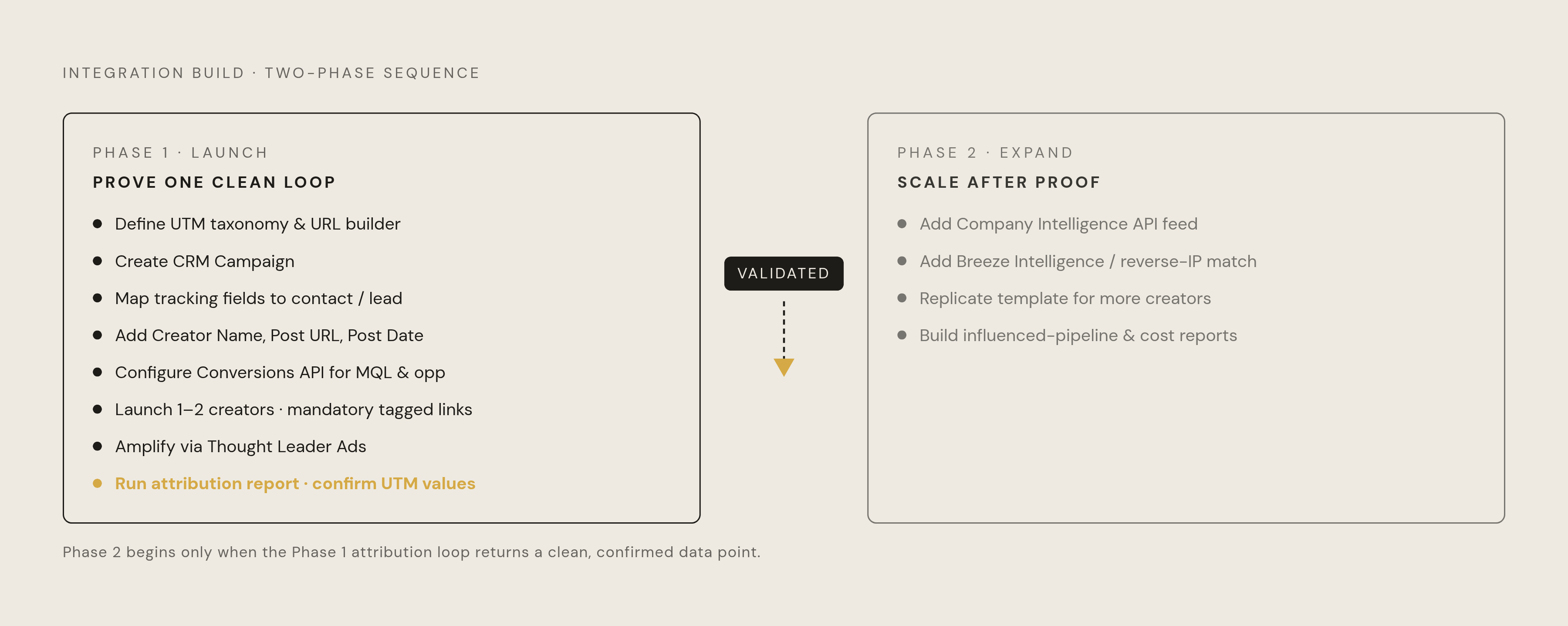
Build the smallest attributable loop first. Before launch, define the UTM taxonomy and a shared URL builder, create the CRM Campaign, and map tracking fields into contact or lead records. Add Creator Name, Post URL, and Post Date to the campaign metadata. Set up the Conversions API connection so MQL and opportunity events can return to Campaign Manager.
Launch with one or two creators whose briefs make the tagged links mandatory. Amplify through Thought Leader Ads with the same campaign ID in Campaign Manager and the CRM. At the campaign's end, run the contact attribution report and confirm that the UTM values are populating before expanding the roster.
After that loop works, add the Company Intelligence API feed and Breeze Intelligence or equivalent reverse-IP matching. Use the same template for working with more creators, then build reports on influenced pipeline and compare costs across channels. One clean data point from one creator is worth more than an elaborate attribution model with nothing in it. The strategic payoff is credibility, with creator campaigns entering pipeline reviews on the strength of traceable revenue.